
SportsTimer Event4.0.0 - Google Play
You'll be able to see results in few seconds.
Publisher Description
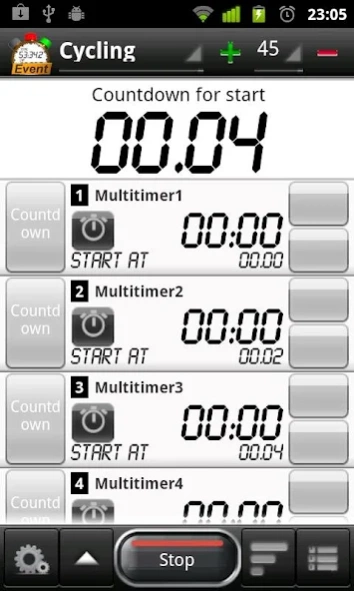

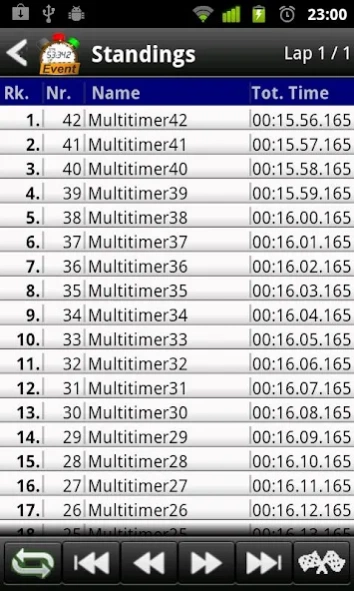

SportsTimer Event offers up to 100 stopwatches for different types of event.
SportsTimer Event, a timekeeping app, offers up to 100 stopwatches for different types of event. If you're in charge of timing multiple participants at once, this versatile app is up to the challenge.
SportsTimer Event is based on the SportsTimer Pro app, but offers now a extended number (12 --> 100) of parallel stopwatches.
You'll use it for a larger race or event. It supports simultaneous recording of up to 100 participants, and it's easy to set up. Before you start, enter the number and name of each participant (by typing or accessing them in your device's contact list). You can time each athlete individually, the entire event at once, or by an interval phase. A preparation phase is also supported by a countdown function.
As the event is in progress, check the intermediate standings with the "hotlist" function. You can document the event by saving to history list or exporting the intermediate and final results to your SD card.
FEATURE LIST:
- General
- Simultaneous recording of interim and final results
of up to 100 participants
- Organization of participants
- Naming option for participants
- Direct text input
- Select a contact.
-> Shows name and image
- Save configuration
- Events can be classified wit three labels
- Results saving to CSV file
- event (name, label),
- date,
- name of participant
- Timing
- Start Options
- Manual start of each participant
- Simultaneous launch of all participants
- Automatic purging start of all participants
- Optional countdown before total / interval Start
- Simultaneous recording of
- interim and
- final results
- Hotlist shows the ranking
Options
Sharing options
-Save results to SD-card in csv-format
-Sharing results via email, twitter etc
Interface options
- Setup orientation mode
- Setup timing format:
Set your numbers of digits or add day information
- Choice specific timermode as startscreen
About SportsTimer Event
The company that develops SportsTimer Event is mewe. The latest version released by its developer is 4.0.0.
To install SportsTimer Event on your Android device, just click the green Continue To App button above to start the installation process. The app is listed on our website since 2013-12-14 and was downloaded 0 times. We have already checked if the download link is safe, however for your own protection we recommend that you scan the downloaded app with your antivirus. Your antivirus may detect the SportsTimer Event as malware as malware if the download link to biz.mewe.mobile.sportstimerevent is broken.
How to install SportsTimer Event on your Android device:
- Click on the Continue To App button on our website. This will redirect you to Google Play.
- Once the SportsTimer Event is shown in the Google Play listing of your Android device, you can start its download and installation. Tap on the Install button located below the search bar and to the right of the app icon.
- A pop-up window with the permissions required by SportsTimer Event will be shown. Click on Accept to continue the process.
- SportsTimer Event will be downloaded onto your device, displaying a progress. Once the download completes, the installation will start and you'll get a notification after the installation is finished.
Program Details
System requirements
Download information
Pricing
Version History
version 4.0.0
posted on 2013-12-14
Overall,- ActionBar,- Support of 3 different themes (dark, light, light with dark action bar),MultiTimer,- Changed: New edit mode in action bar to add/removers timers or change timer order,- Changed: Pause action is dropped. In stop mode timer can now be restarted and last lap will be deleted,LapTimer,- New: Chart view for lap times.,- Live mode: Chart view has a live update during run mode,- Color indicators: Fastest and slowest lap will color coded
version 3.6.1
posted on 2013-05-23
Several fixes and updates
Disclaimer
Official Google Play Link
We do not host SportsTimer Event on our servers. We did not scan it for viruses, adware, spyware or other type of malware. This app is hosted by Google and passed their terms and conditions to be listed there. We recommend caution when installing it.
The Google Play link for SportsTimer Event is provided to you by apps112.com without any warranties, representations or guarantees of any kind, so access it at your own risk.
If you have questions regarding this particular app contact the publisher directly. For questions about the functionalities of apps112.com contact us.
